

 By
By 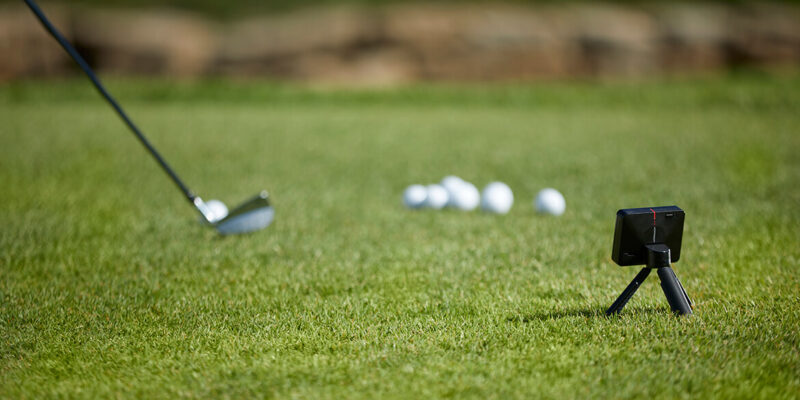
Turn Data into Distance, Right from Home
We’re a team of golf enthusiasts with decades of coaching and tech experience under our belts. We know how frustrating it can be to guess what’s happening behind your shot. That’s why we turned to a golf launch monitor to get real numbers—ball speed, launch angle, spin rate, you name it. You might be wondering… do you really need all that data? Let’s be honest; numbers don’t lie. They show exactly where your swing falls short and where it shines. And here’s the best part: once you see the facts, you can fix the flaws. By the end of this article, you’ll understand how to pick the right gear, set it up without a headache, and use practical tips—so every practice session counts. Ready to take your game from guesswork to precision? Let’s dive in.
Why a Launch Monitor Changes Everything
People often practice blind. They hit balls, hope for the best, and leave without knowing what worked. A launch monitor shines a light on your swing, so you make smart tweaks—rather than random ones.
- Immediate Feedback: See shot data right away.
- Track Progress: Compare numbers over time.
- Custom Drills: Use metrics to focus on what truly needs work.
You’ll no longer wonder if your slice is getting worse or better. You’ll know.
Choosing the Right Device
Accuracy vs. Budget
Not all monitors cost a fortune, but cheaper units sometimes cut corners on data quality. Decide what metrics matter most to you. A basic model might track ball speed and carry distance. A pro-level device adds spin rate and club path.
Portability and Power
Think about where you’ll practice. A lightweight, battery-powered unit works great at the range. If you set up in your garage, a plugged-in model with a mount can deliver extra stability.
Software and App Integration
Check that the monitor syncs with your phone or computer. Clear charts make it easier to spot trends. Some apps even let you replay each shot in 3D—cool but optional.
Setting Up Your Practice Zone
- Space: Aim for at least ten feet behind and in front of the ball.
- Lighting: Even light reduces sensor errors.
- Mat and Net: A sturdy hitting mat plus a protective net keep your gear safe.
- Calibration: Follow the manual—skipping this step can throw off every reading.
A little prep goes a long way. Trust me, you don’t want to chase ghost data.
Turning Data into Better Shots
- Identify One Metric: The spin rate may be high.
- Design a Drill: Lower your attack angle to cut the spin.
- Repeat and Record: Track changes in the same session.
- Set Small Goals: Shave off 500 RPM or add five yards of carry.
It’s like having a coach whispering in your ear but without the awkwardness.
Common Missteps to Avoid
Even with great gear, mistakes happen. Watch out for these:
- Overfocusing on Numbers: Don’t obsess over every decimal.
- Skipping Warm-Ups: Cold swings give bad data.
- Neglecting Routine: Random practice won’t move the needle.
Stay balanced. Use the monitor as a guide, not a tyrant.
Seeing Real Results
In a recent club fitting study, golfers who used launch monitors improved their driver distance by an average of 12 yards in three weeks. They fine-tuned launch conditions and club selection based on hard data. That’s not magic; it’s smart practice.
Conclusion: Your Next Steps
We’re here to help you turn raw numbers into real gains. Embrace the clarity a launch monitor brings. Focus on one tweak at a time, and track your wins—big or small. Stick with it, and you’ll see improvement in weeks.
Ready to bring pro-level feedback to your practice? Let’s get started today!









Comments